Sylius Digital Download: Configuration
Configuring Sylius Digital Download: settings page in the admin, YAML defaults, files on variants, storage, web server limits and practical examples.
Sylius Digital Download: Configuration
This documentation always describes the latest published version.
Settings page
In the admin sidebar, under MMKreativ Plugins → Digital downloads, you find the settings page (route mmd_digital_download_admin_settings, path /admin/digital-download/settings, the admin part follows your admin path). The settings apply to the whole shop, not per channel.
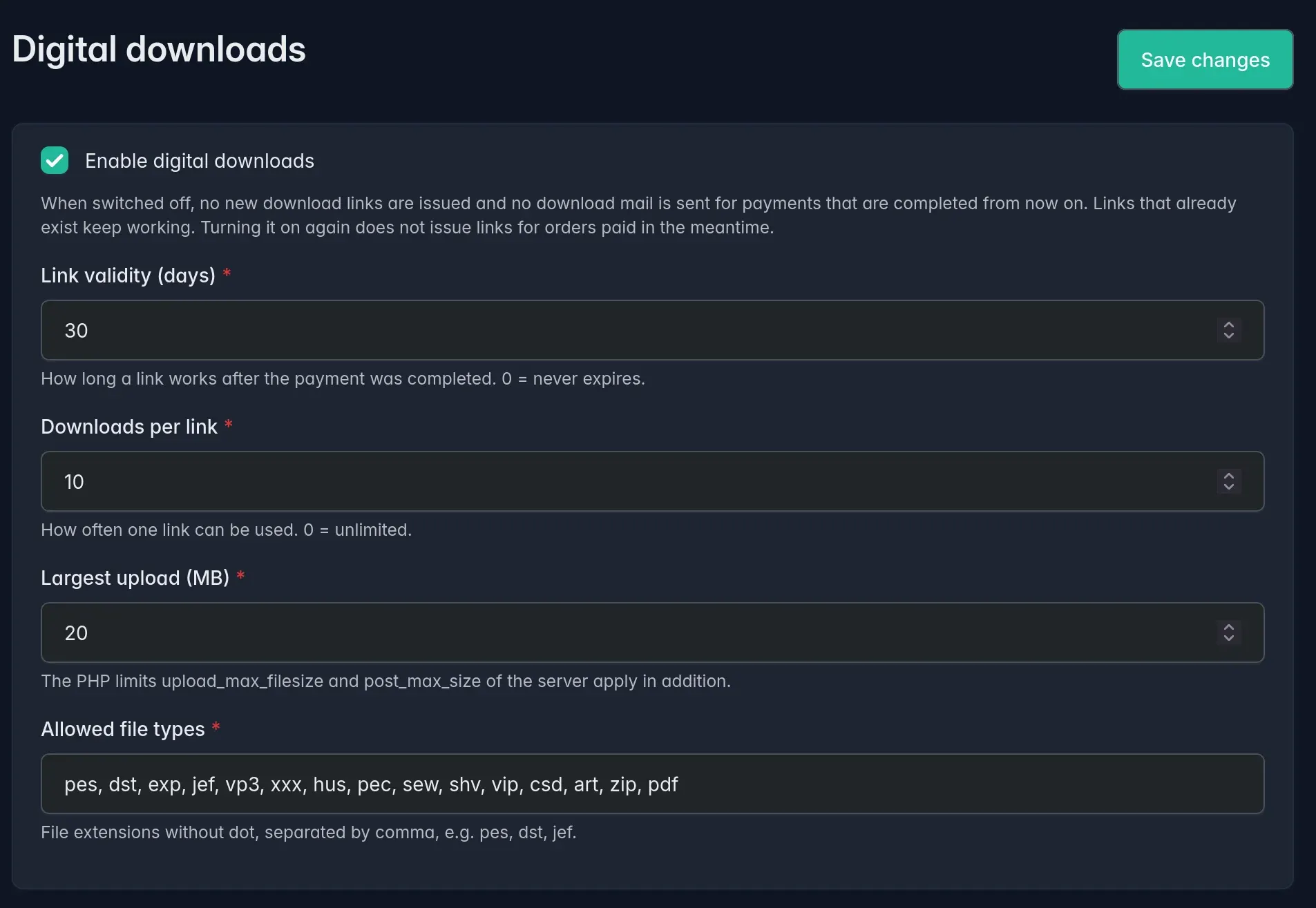
| Setting | Default | Description |
|---|---|---|
| Enable digital downloads | on | Main switch. Off: for payments that are completed from now on, no links are created and no email is sent. Existing links keep working. For orders that were paid during the pause, no links are created even after switching it back on. |
| Link validity (days) | 30 | How long a link works after the payment is completed. 0 = never expires. |
| Downloads per link | 10 | How often a link can be used. 0 = unlimited. |
| Largest upload (MB) | 20 | Upload limit for admins. The PHP limits upload_max_filesize and post_max_size apply in addition. |
| Allowed file types | pes, dst, exp, jef, vp3, xxx, hus, pec, sew, shv, vip, csd, art, zip, pdf |
File extensions without a dot. Comma, semicolon and space work as separators, the list is stored lowercase and without duplicates. |
The form validates ranges: "Link validity (days)" 0 to 3650, "Downloads per link" 0 to 100000, "Largest upload (MB)" 1 to 1024. At least one extension is required, each may only contain letters and digits and be at most 10 characters long. The YAML keys have no upper limit.
Changes apply to links issued afterwards. Existing links keep the validity and limit they were issued with.
Defaults via YAML
The same values can be set in config/packages/mmd_sylius_digital_download.yaml. They are only the default that applies until the settings page has been saved once. After that, the value from the database wins.
mmd_sylius_digital_download:
    expiry_days: 30
    max_downloads: 10
    max_file_size_mb: 20
    allowed_extensions: [pes, dst, exp, jef, vp3, xxx, hus, pec, sew, shv, vip, csd, art, zip, pdf]
    storage: mmd_sylius_digital_download.storage
| Key | Type | Default | Note |
|---|---|---|---|
expiry_days |
Integer, min. 0 | 30 |
Default for "Link validity (days)" |
max_downloads |
Integer, min. 0 | 10 |
Default for "Downloads per link" |
max_file_size_mb |
Integer, min. 1 | 20 |
Default for "Largest upload (MB)" |
allowed_extensions |
List | see above | Default for "Allowed file types" |
storage |
Service ID | mmd_sylius_digital_download.storage |
Only configurable via YAML, not in the admin |
Files on a variant
The variant form (create and edit) has a Digital download section. There you upload one or more files, for example one per hoop size or one per machine format. Files that are already uploaded are listed below, and with a checkbox you delete them on the next save.
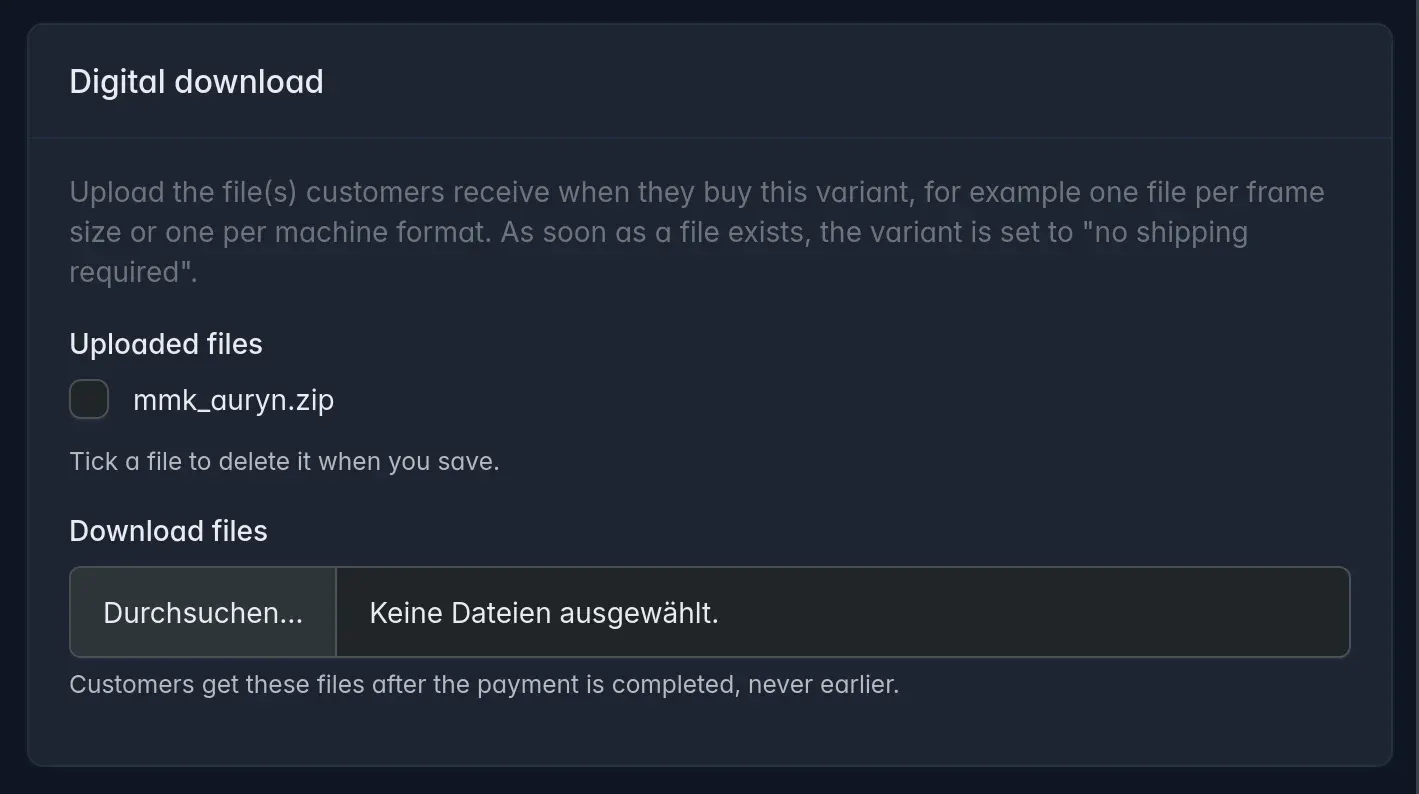
- Every upload is validated: the extension must be in the list of allowed file types, the file must not be empty and not larger than the configured limit. On an error, the field shows a form message and the file is not saved.
- The file is stored under a random name (
year/month/32 characters.extension). The original name is kept only as the label for the download. - As soon as at least one file is attached to the variant after saving, the variant is saved with "Shipping not required".
- Deleting the last file does not reset "Shipping required". Check the checkbox on the variant yourself in that case.
- If you delete a file, all download links pointing to it are removed as well.
- A file that you attach to a variant later does not apply retroactively: earlier buyers do not get it.
Web server limits
Uploads pass through the web server before they reach PHP. By default, nginx rejects requests over 1 MB with 413 Request Entity Too Large. Set client_max_body_size (nginx) or LimitRequestBody (Apache) as well as the PHP values upload_max_filesize and post_max_size to at least the largest file you want to allow in the settings.
Storage
By default, the files are stored in var/digital-downloads, a local Flysystem storage outside the web root. The plugin creates it only if the Flysystem bundle is registered in your app, a Flysystem configuration of your own app overrides it.
- Include the directory in your backup.
- With several app servers, it must be a shared volume.
storageaccepts the service ID of anyLeague\Flysystem\FilesystemOperator, an S3-compatible storage replaces the local one without code changes.
Keep the bucket private. The app delivers every download itself after checking the token. A public CDN URL would bypass the payment check.
Practical examples
Embroidery files per machine format (default values)
A variant "Hoop 10 x 10" gets one .pes and one .jef file. With the default values, each link is valid for 30 days and can be used ten times. The customer receives two links in one email, one per file.
Large ZIP packages, short validity
For a 150 MB package, you raise "Largest upload (MB)" to 200, adjust the web server limits (for example client_max_body_size 200m;) and set "Link validity (days)" to 7 and "Downloads per link" to 3. Anyone who needs the link after a week has to contact you.
Valid indefinitely
With "Link validity (days)" 0 and "Downloads per link" 0, every new link stays usable permanently. It is then blocked only by a refund.
Files in S3 instead of on disk
First define a private Flysystem storage in your app (here with the AWS adapter, assuming league/flysystem-aws-s3-v3):
# config/packages/flysystem.yaml
flysystem:
    storages:
        digital_downloads.storage:
            adapter: 'aws'
            options:
                client: 'app.s3_client'
                bucket: 'my-private-bucket'
                prefix: 'digital-downloads'
Then point the plugin to it:
# config/packages/mmd_sylius_digital_download.yaml
mmd_sylius_digital_download:
    storage: digital_downloads.storage
Files that are already uploaded do not move along. Switch the storage before you upload the first files, or copy the existing files including their paths to the new storage.