PDF Invoices: Template and Variables
The invoice template of the PDF Invoices module for OXID eShop 7.x: structure, payment blocks, complete list of template variables and notes on customizing it.
PDF Invoices: Template and Variables
This documentation always describes the latest published version.
The look of the invoice is defined by a single Twig template. This page describes its structure, the payment blocks and the variables the module passes to the template.
The invoice template
| Property | Value |
|---|---|
| File in the module | views/twig/pdf/invoice.html.twig |
| Template name in the module | @mmd_pdfinvoice/pdf/invoice |
| PDF engine | Dompdf (A4 portrait, default font DejaVu Sans) |
The module always renders exactly this template under the fixed name @mmd_pdfinvoice/pdf/invoice. There is no setting to select a different template.
The labels in the template are hard-coded in German (for example "Rechnungsnummer", "Zwischensumme (netto)", "Vielen Dank für Ihren Einkauf!"). The PDF invoice is therefore always created in German, regardless of the shop language.
Layout of the invoice
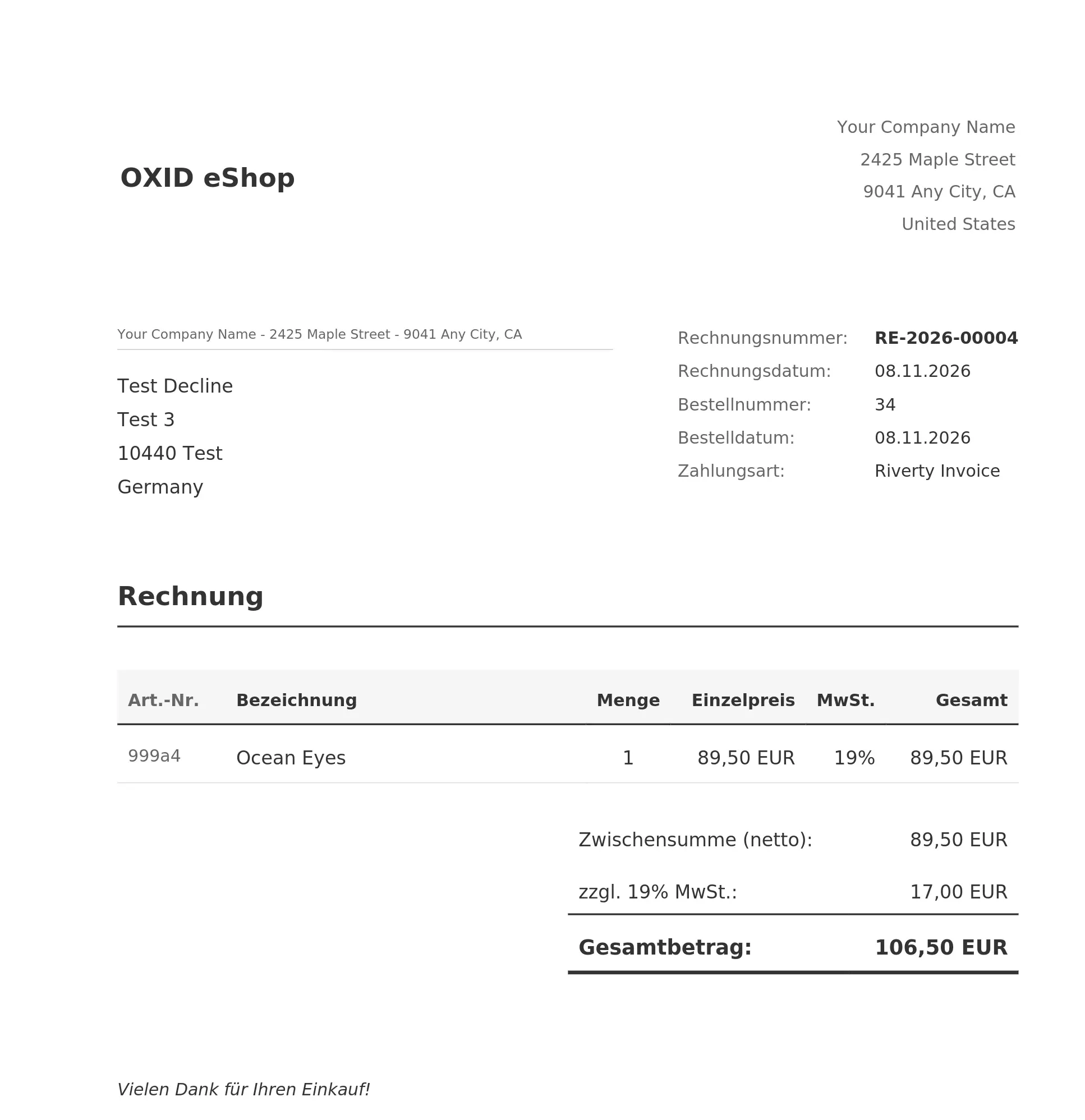
- Header with logo (or the shop name if no logo is found) and company address
- Address field with sender line and the customer's billing address
- Invoice data next to the address field: invoice number, invoice date, order number, order date, customer VAT ID (if present), payment method
- Items with article number, description (including the selected variant), quantity, unit price, VAT rate and total (all net)
- Totals with subtotal (net), VAT breakdown, shipping costs, payment method costs, discount and total amount
- Payment information, depending on the payment method
- Footer with company details, contact details, tax details and bank account
Shipping costs, payment method costs and discount only appear when the respective amount is greater than 0. The delivery address and the order remark are passed to the template, but the bundled template does not print them.
Payment blocks
The "Zahlungsinformationen" block depends on the OXID payment ID (payment.type):
| Payment ID | Output |
|---|---|
oxidpayadvance (prepayment) |
Request to transfer the amount within 7 days to the shop's account (bank name, IBAN, reference) |
oxidinvoice (invoice) |
Request to transfer the amount within 14 days to the shop's account (bank name, IBAN, reference) |
oxiddebitnote (direct debit) |
Notice of the SEPA direct debit with amount, date and the customer's IBAN, creditor ID, mandate reference and account holder |
| all others | no payment block of their own, only the payment method in the invoice data |
The SEPA block uses these template fallbacks:
- Collection date:
invoice.debit_date; if it is not set (the module does not set it), the invoice date - Mandate reference:
payment.mandate_ref; if it is not set (the module does not set it), the textBESTELL-followed by the order number - Creditor ID: only printed if it is stored in the module settings
Customizing the template
The module has no mechanism of its own for a replaced template. Changes are made directly in views/twig/pdf/invoice.html.twig in the module directory (source/modules/mmd/pdf-invoice).
Changes to the template file in the module directory are lost on a Composer update. Back up your customized file and restore it after every update.
After a change, clear the cache (vendor/bin/oe-console oe:cache:clear). Invoices that already exist do not change. Only the "Regenerate PDF" button in the order renders the PDF again with the current template.
Available variables
The variables in the following tables are available both when an invoice is created and when a PDF is regenerated from the snapshot. Additional variables that exist only on regeneration are listed in the section "Available only when regenerating".
Invoice (invoice.)
| Variable | Description |
|---|---|
invoice.number |
Invoice number |
invoice.date |
Invoice date, format DD.MM.YYYY |
Order (order.)
| Variable | Description |
|---|---|
order.number |
Order number |
order.date |
Order date, format DD.MM.YYYY |
order.currency |
Currency, for example EUR |
order.remark |
Customer's order remark (not printed by the bundled template) |
Billing address (billing.)
| Variable | Description |
|---|---|
billing.salutation |
Salutation |
billing.company |
Company |
billing.firstname |
First name |
billing.lastname |
Last name |
billing.street |
Street |
billing.streetnr |
House number |
billing.addinfo |
Address addition |
billing.zip |
ZIP code |
billing.city |
City |
billing.country |
Country |
billing.vatid |
Customer VAT ID |
Delivery address (delivery.)
The variable delivery is empty (null) if the order has no last name stored for the delivery address. Otherwise it contains salutation, company, firstname, lastname, street, streetnr, addinfo, zip, city and country with the same meaning as for the billing address.
Items (items)
items is a list. Each element contains:
| Variable | Description |
|---|---|
item.artnum |
Article number |
item.title |
Article title |
item.selvariant |
Selected variant |
item.amount |
Quantity |
item.nprice |
Net unit price (field oxnprice) |
item.netprice |
Net total of the position (field oxnetprice) |
item.brutprice |
Gross total of the position (field oxbrutprice) |
item.price |
Unit price from the field oxprice of the order item |
item.vatpercent |
VAT rate in percent |
Totals (totals.)
| Variable | Description |
|---|---|
totals.netsum |
Net sum of the articles |
totals.brutsum |
Gross sum of the articles |
totals.totalsum |
Total amount of the order |
totals.delcost |
Shipping costs |
totals.paycost |
Payment method costs |
totals.discount |
Discount |
totals.vat_breakdown |
List of VAT amounts, each entry with rate and amount |
Payment (payment.)
| Variable | Description |
|---|---|
payment.type |
OXID payment ID, for example oxidpayadvance |
payment.name |
Name of the payment method |
payment.debit.iban |
Customer IBAN (direct debit only) |
payment.debit.owner |
Account holder (direct debit only) |
payment.debit.bic |
Customer BIC or bank code (direct debit only) |
payment.debit.bankname |
Customer bank name (direct debit only) |
The payment.debit.* values only exist if the payment method is oxiddebitnote and the bank details were found in the order.
Shop (shop.)
These values come from the master data of the active shop. They are read again every time the PDF is created or regenerated.
| Variable | Description |
|---|---|
shop.name |
Shop name |
shop.company |
Company name |
shop.street |
Street |
shop.zip |
ZIP code |
shop.city |
City |
shop.country |
Country |
shop.phone |
Phone |
shop.fax |
Fax |
shop.email |
Email address |
shop.vatid |
VAT ID |
shop.taxnumber |
Tax number |
shop.hrb |
Commercial register number |
shop.court |
Register court |
shop.bank_name |
Bank name |
shop.bank_code |
Bank code |
shop.bank_account |
Account number |
shop.iban |
IBAN |
shop.bic |
BIC |
shop.creditor_id |
SEPA creditor ID from the module settings |
Other
| Variable | Description |
|---|---|
config.logo |
Absolute file path (file://...) of the logo, or empty if no logo was found |
locale |
Language code of the current shop language, for example de |
The variables
invoice.debit_dateandpayment.mandate_refare not set by the module. The bundled template only provides them as optional values with a fallback.
Available only when regenerating
When a PDF is regenerated ("Regenerate PDF"), the module passes the stored snapshot data for addresses and items to the template unchanged. The snapshot contains some fields that are not passed to the template when the invoice is first created. These variables are only available when the PDF is rendered again from the snapshot:
| Variable | Description |
|---|---|
billing.country_id |
ID of the billing address country |
billing.state |
ID of the billing address state |
billing.phone |
Phone of the billing address |
billing.fax |
Fax of the billing address |
billing.email |
Email address of the billing address |
delivery.country_id |
ID of the delivery address country |
delivery.state |
ID of the delivery address state |
delivery.phone |
Phone of the delivery address |
delivery.fax |
Fax of the delivery address |
item.shortdesc |
Short description of the article |
item.vat |
VAT amount of the position (field oxvatprice) |
item.bprice |
Gross unit price (field oxbprice) |
item.weight |
Weight of the position |
The bundled template does not use these variables. If you use them in a customized template, they stay empty on a newly created invoice until the PDF is regenerated.
Adding your own payment method
To support another payment method, add another branch to the template. The ID is the OXID payment ID from oxpayments.OXID:
{% elseif payment.type == 'your_payment_id' %}
<div class="payment-info">
    <h4>Zahlungsinformationen</h4>
    <p>Your specific payment information here...</p>
</div>
Related pages
- Configuration: logo, creditor ID and storage path
- Technical: PDF creation flow and snapshot structure