Riverty Payments: Configuration
Configuring Riverty Payments for Sylius - per-channel settings, API keys per country, creating payment methods, checking the contract, API log and retention, practical examples
Riverty Payments: Configuration
This documentation always describes the latest published version.
You find the settings in the admin under MMKreativ Plugins → Riverty Payments. There is one setting per channel, not a global one. The list shows the active countries of each channel, meaning the countries that have an API key.
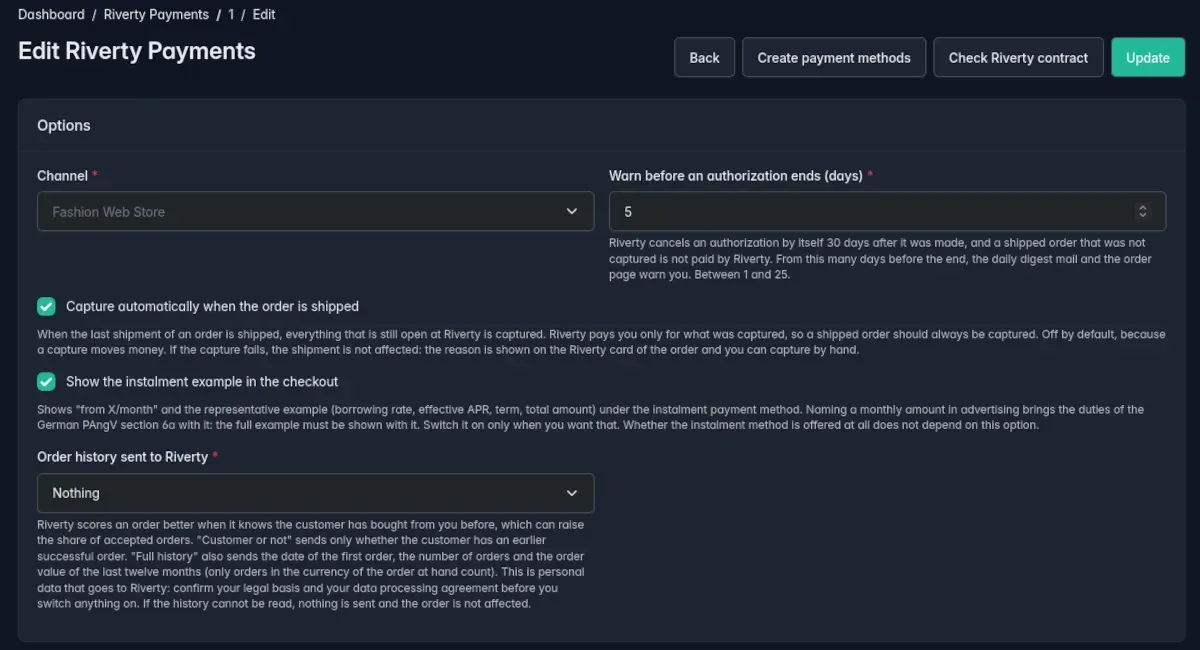
Settings of a channel
The page has two cards: the Options card and the Countries and API keys card.
Options card
| Setting | Default | Description |
|---|---|---|
| Channel | – | The channel the setting applies to. It cannot be changed after creation, because the transactions refer to the channel. There is exactly one setting per channel |
| Show the instalment example in the checkout | off | Shows "from X/month" and the representative example under the instalment method, see Storefront |
| Capture automatically when the order is shipped | off | Captures the open amounts at Riverty as soon as the last shipment of the order is shipped, see Order management |
| Warn before an authorization ends (days) | 5 | Lead time of the warning before the reservation ends, 1 to 25 days, see Reconciliation and expiry |
| Order history sent to Riverty | Nothing | Which details about earlier orders of the customer go to Riverty, see the section Order history sent to Riverty below |
Capture on shipment is off by default, because a capture moves money. Switch the option on only after you have tested the flow in the sandbox.
Countries and API keys card
There is one row for each supported country: Germany, Austria, Switzerland, the Netherlands, Belgium, Norway, Sweden, Denmark and Finland. A country without a key stays inactive.
| Field | Description |
|---|---|
| Sandbox mode | Switches the country between test and live. With the sandbox on, the test key is used, otherwise the live key |
| Test API key | Key for the Riverty sandbox |
| Live API key | Key for Riverty production |
- The key fields are write-only: a saved key is never shown again, the field only displays dots to indicate that a key exists. If you leave the field empty, the saved key stays unchanged.
- A country is active as soon as the key for its current mode (sandbox or live) is set.
- The keys are stored encrypted in the database. The encryption key comes from
APP_SECRET, see the warning on the Installation page.
Countries and currencies
Riverty is offered only for billing countries that have a key in the channel, and only in the currency Riverty accepts there.
| Country | Currency |
|---|---|
| Germany (DE), Austria (AT), the Netherlands (NL), Belgium (BE), Finland (FI) | EUR |
| Switzerland (CH) | CHF |
| Norway (NO) | NOK |
| Sweden (SE) | SEK |
| Denmark (DK) | DKK |
Pay in X is available in the Netherlands only.
Order history sent to Riverty
Riverty scores an order better when it knows the customer has bought from you before, which can raise the share of accepted orders. The option Order history sent to Riverty has three levels:
| Level | What goes to Riverty |
|---|---|
| Nothing (default) | No information about the history. The IP address is always sent |
| Customer or not | Whether the customer has an earlier successful order |
| Full history | Additionally the date of the first order, the number of orders and the order value of the last twelve months |
The order history is personal data. Confirm your legal basis and your data processing agreement before you switch the option on.
A successful order is an order of the same customer in the same channel that is completed and not cancelled and whose payment went through (authorized, paid, or paid and then refunded in part or in full). The current order does not count. Orders that still await their payment, such as an unpaid bank transfer or an abandoned Riverty attempt, do not count either, so a stranger does not look like a returning customer. For a guest, Sylius matches the earlier orders by e-mail address.
- The number covers all successful orders, including those older than twelve months.
- The order value of the last twelve months adds up only orders in the currency of the order at hand.
- If the history cannot be read, nothing goes to Riverty and the order is not affected. The plugin then writes a warning to the log, without customer data.
Notices in the admin
The checkout silently hides a payment method when a prerequisite is missing. So that you do not have to guess why, the admin shows notices above the list of settings and above the form: what keeps Riverty out of the checkout and what to do next. If the channel has no contact email, the settings page warns you, because the digest mail needs it.

Payment methods and contract
At the top of the edit page of a channel there are two buttons.
Create payment methods
Creates the Riverty payment methods for the channel: invoice, direct debit, instalments and, if the Netherlands have a key, Pay in X.
| Code | Payment method |
|---|---|
RIVERTY_INVOICE |
Invoice |
RIVERTY_DIRECT_DEBIT |
Direct debit |
RIVERTY_INSTALLMENT |
Instalments (fixed instalments) |
RIVERTY_PAY_IN_X |
Pay in X, only with a key for the Netherlands |
The button only adds: an existing payment method keeps its name, its enabled flag and its other channels, and only gets the channel if it was missing. Clicking again changes nothing. The result is shown as messages: created, already present, channel added, not applicable or repaired.
Do not create Riverty payment methods by hand. Sylius starts new payment methods on the Payum model, but there is no Payum factory for Riverty. The button switches this correctly and repairs a payment method where it was set wrongly by hand.
A payment method created or edited by hand has exactly one field in its gateway form, the Riverty payment type (Invoice, Direct debit, Fixed instalments, Pay in X).
Check Riverty contract
Asks Riverty what your contract offers per country and shows the answer as messages. The button is purely diagnostic and changes nothing. The answer depends on the amount (especially for instalments), so it is a probe at 100.00 in the currency of each market. If an expected payment method is missing from the answer, it is named.

API log
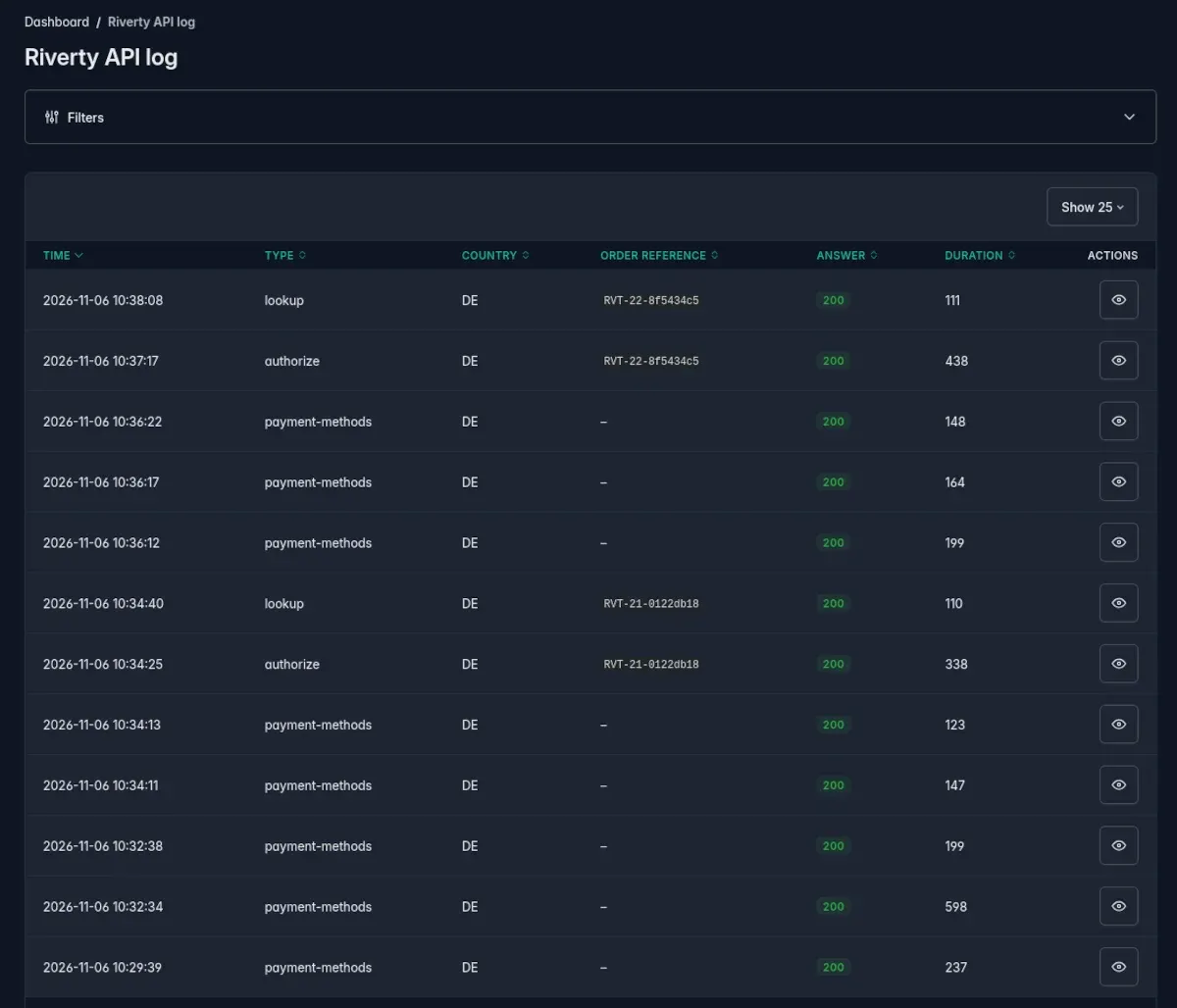
Every call to Riverty is logged. The Riverty API log button on the Riverty Payments page opens the list, newest first. You can narrow it down:
| Filter | Values |
|---|---|
| Time | Date |
| Type | authorize, capture, void, refund, lookup, payment-methods, validate |
| Country | DE, AT, CH, NL, BE, NO, SE, DK, FI |
| Outcome | succeeded or not |
| Order reference | Text |
The list shows time, type, country, order reference, answer and duration, with 25, 50 or 100 entries per page. A click shows request and response in full, and the Riverty card on the order page links to the calls of that order. Use the log when Riverty refuses an order and you want to see exactly what was sent and answered.
- Personal data in the bodies (name, address, email, phone, identification number, birth date) is masked the same way as in the debug log. The API key is never stored. Bodies longer than 64 KB are cut.
- The log is written with its own database connection: a call that happened at Riverty stays in the log even when the shop's transaction is rolled back. A log that cannot be written never stops a payment.
- The pages are read only: the log cannot be edited or deleted from the admin.
Retention
Entries are kept for 30 days. mmd:riverty:reconcile (the cron job) removes older ones. You set the time in a parameter of your application, for example in config/services.yaml:
parameters:
    mmd_sylius_riverty_payments.api_log_retention_days: 14
mmd:riverty:reconcile --api-log-days=7 overrides the value for one run, --dry-run only reports how many entries would go.
Examples
A shop for Germany only, starting in the sandbox
- Create the setting for your channel, leave Sandbox mode on for Germany and enter the test key.
- Click Create payment methods: invoice, direct debit and instalments are created.
- Click Check Riverty contract and verify that all three payment methods are reported for Germany.
- Place a test order in the storefront in EUR.
- For go-live, enter the live key and switch the sandbox toggle off.
Germany and the Netherlands
Enter keys for Germany and the Netherlands and click Create payment methods: besides the three payment methods, Pay in X is created. Pay in X appears only for a billing address in the Netherlands.
Automatic capture on shipment
Switch on Capture automatically when the order is shipped and enter a contact email in the channel settings. When you ship the last shipment of an order, the plugin captures everything that is still open at Riverty. If that fails, the shipment stays in place and the reason is shown on the Riverty card of the order.