Riverty Payments: Order Management
Managing Riverty payments for Sylius - capture, void and refund on the order page, partial quantities per capture, discounts, automatic capture on shipment
Riverty Payments: Order Management
This documentation always describes the latest published version.
You manage Riverty payments with the Riverty buttons Capture, Void and Refund on the order page in the admin. They tell Riverty first and only move the Sylius payment once Riverty has accepted the change.
The Riverty card on the order page
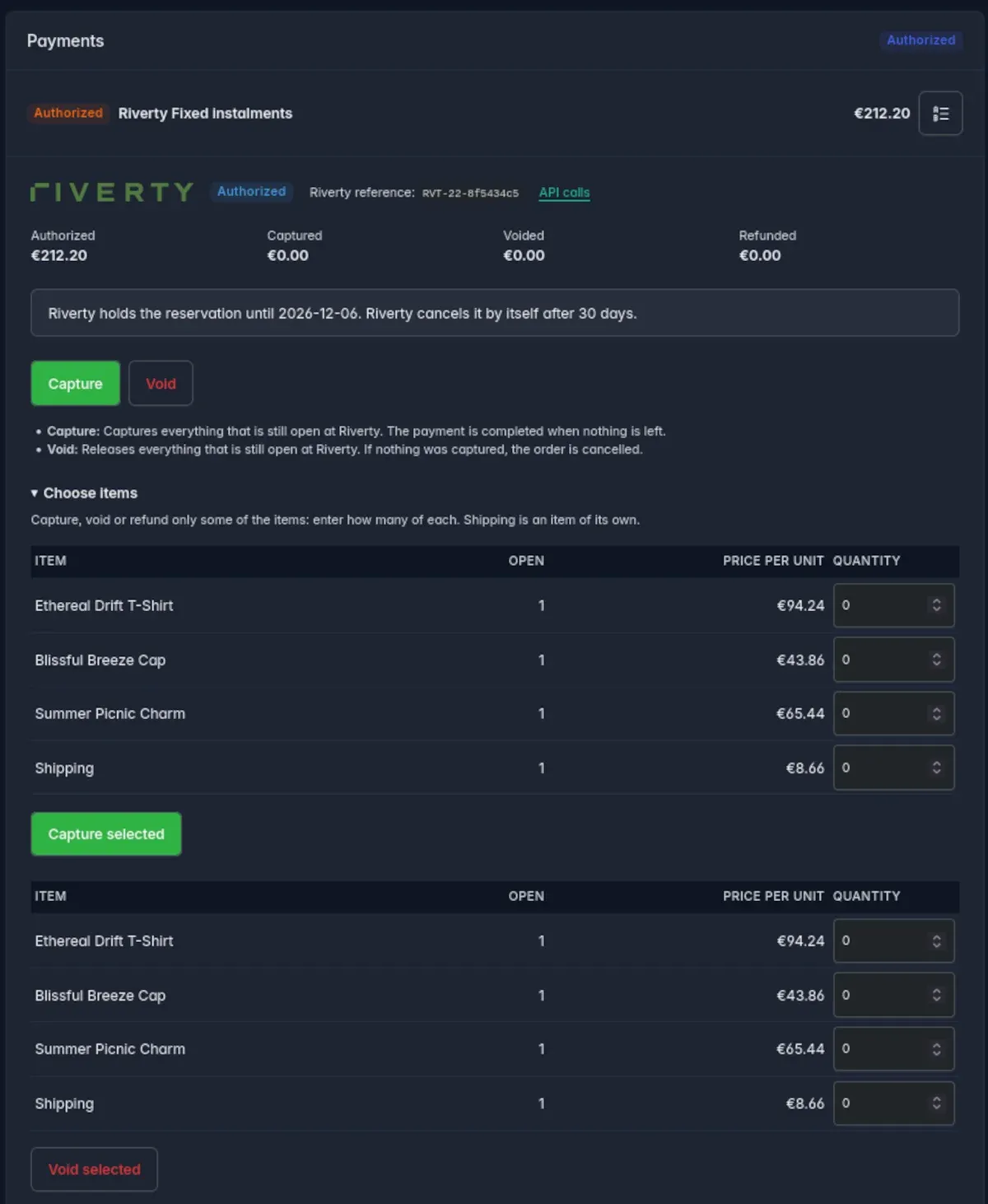
The order page shows a Riverty card in the payments box, one block per Riverty payment:
- the status and the Riverty reference
- the authorized, captured, voided and refunded amounts in the order currency
- the last error that Riverty or the plugin reported
- only the buttons the status allows, each with a line that says what it does
- the note about the reservation, see Reconciliation and Expiry
Sylius' own buttons are blocked for Riverty. The Complete and Refund buttons of a payment only change the state in Sylius and never reach Riverty, so the order would read "paid" or "refunded" while Riverty knows nothing about it. The plugin blocks these two transitions for Riverty payments that have a Riverty transaction: the buttons disappear and the plugin's own buttons do the work. This needs the default adapter
symfony_workflow; with the legacywinzou_state_machinethe Sylius buttons stay.
The whole order
The buttons act on everything that is still open:
| Button | Acts on | Result |
|---|---|---|
| Capture | everything that was neither captured nor voided | Riverty captures the amount, the payment is completed |
| Void | everything that was neither captured nor voided | Riverty releases the authorization, the order is cancelled |
| Refund | everything that was captured and not refunded yet | Riverty refunds, the payment counts as refunded |
Void withdraws the sale: after Riverty has released the authorization, the Sylius order is cancelled too, its payment becomes Cancelled and no replacement payment is opened. An order that can no longer be cancelled in Sylius, for example a fulfilled one, keeps its state and only its payment is cancelled.
Parts of an order
Under Choose items on the Riverty card you pick how many of each item to capture, void or refund. Shipping is an item of its own. This lets you capture the goods you shipped today and the rest later, for example.
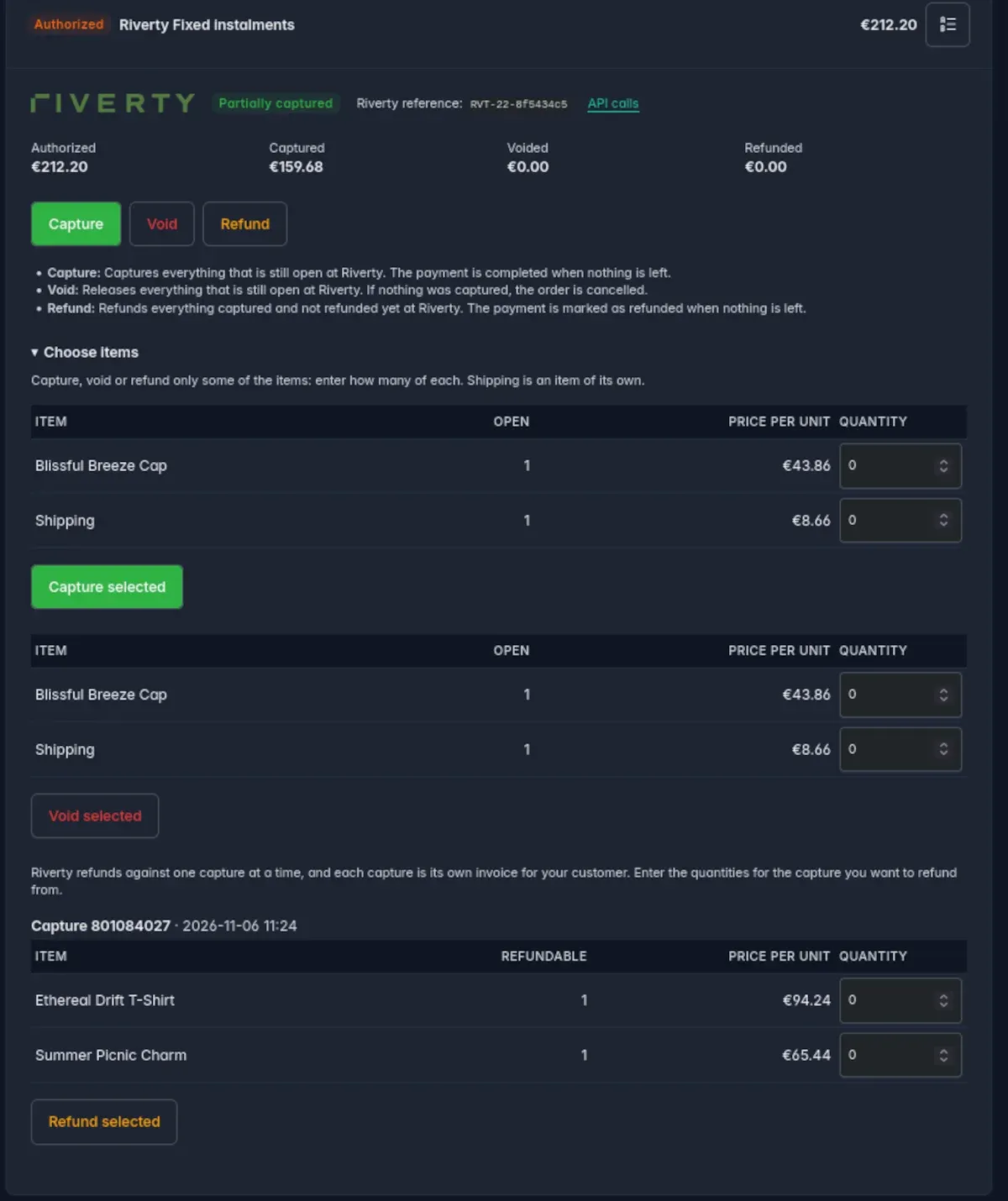
- Capture the chosen items. The payment completes with the capture that leaves nothing open; until then the transaction is Partially captured.
- Void the chosen items. The authorization stays open for the rest. Voiding the last open items ends the transaction: if nothing was captured, the order is cancelled just like after a whole void. If something was captured, the sale is closed: the payment counts as completed and the order stays, it is not cancelled.
- Refund the chosen items. Riverty refunds per capture, and a capture is its own invoice for your customer. The refund table therefore has one block per capture (with its Riverty number and when it was captured) showing what can still be refunded from it. You choose the capture and the quantities in it, and exactly those units are refunded against exactly that capture, one call per capture. The Refund button without a choice refunds everything that is left, capture by capture. A capture from before the time was recorded is listed without a time.
The payment counts as refunded when everything captured has been refunded and nothing is open. If you refund only part of a partly captured order, the transaction stays Partially captured, so the rest can still be captured or voided.
Discounts
A promotion on an article is split over its units and travels with the units you choose: if you capture one of two discounted mugs, the mug and its share of the discount line go to Riverty. A capture made before items were tracked counts as a capture of everything.
Whether Riverty accepts every partial request in its exact form (item lines, the discount share, one refund per capture) can only be seen against your Riverty contract. Use the sandbox first, and look at the calls in the API log if Riverty refuses one.
Capture on shipment
Riverty pays you only for what was captured, so an order that has shipped should always be captured. The option Capture automatically when the order is shipped in the Options card of a channel's settings does it for you:
- When the last shipment of an order is shipped (from the order page, the API or anywhere else; an order with several shipments waits for the last one), everything that is still open at Riverty is captured, after a partial capture only the rest.
- The option is off by default, because a capture moves money.
- The capture runs after the shipment has been stored and the response has been sent, so a slow or unreachable Riverty can neither delay nor undo the shipment. In a long-running worker (
messenger:consume) it runs right after each message, so an order that a message handler ships is captured at once and not only when the worker is restarted. - If it fails, nothing else changes: the order stays shipped, the transaction stays capturable, and the reason is shown on the Riverty card ("Automatic capture on shipment failed: ...") so you can capture by hand.
- A shipped order that is not captured yet (still only authorized, or captured in part with a rest that is still open) is listed first in the daily digest mail.
- A transaction whose authorization Riverty has cancelled is left alone.
- This needs the default adapter
symfony_workflow.
Riverty is the source of truth
The plugin keeps its own books of which items it captured, voided and refunded. A change made directly in the Riverty portal, or a call that Riverty answered but that never reached the plugin, is not noticed: the two can drift apart, and the plugin cannot repair that by itself (the reconcile command only settles payments that were never completed). Make all changes to a Riverty order in Sylius, and compare with the Riverty portal when something looks wrong.