This documentation always describes the latest published version. For older versions, see the CHANGELOG.
Riverty Buy-Now-Pay-Later integration for OXID eShop 7: invoice, direct debit, instalments (Fixed Instalments), and Pay in 3 via Riverty's Hosted Checkout (redirect flow, no PCI scope in your own shop). For OXID shop operators (CE/PE/EE) with a Riverty merchant contract selling in DE, AT, CH, NL, BE, NO, SE, DK, or FI.
Riverty Buy-Now-Pay-Later is popular with customers, but the integration is complex: multi-country API keys, order lifecycle tracking, redirect flow, capture/void/refund logic. This module handles the entire integration β you manage configuration and order handling entirely through the OXID admin, without writing any code.
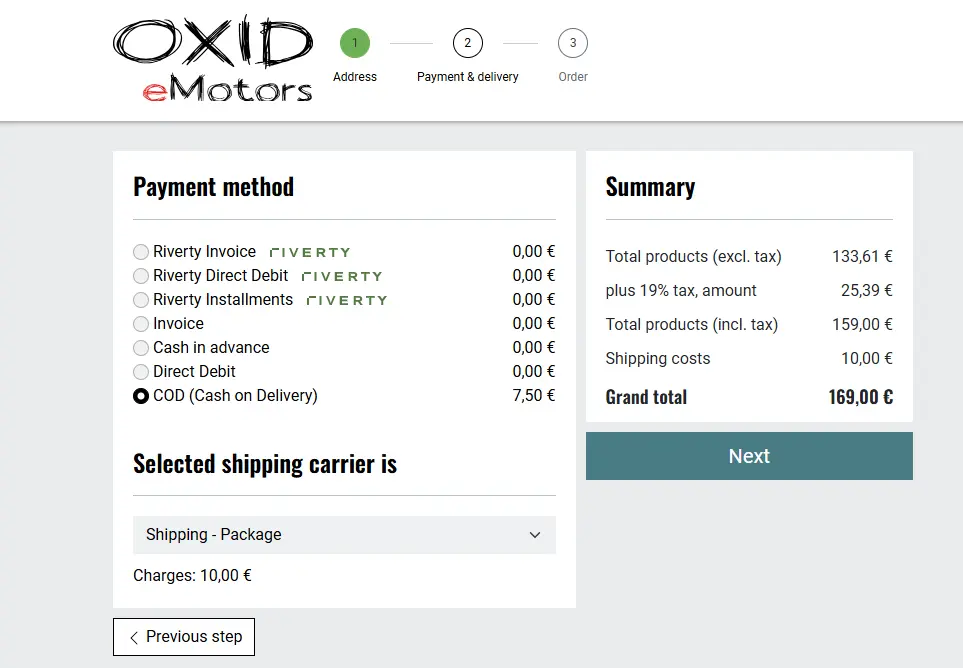
Figure: Payment method selection at checkout
| Feature | Description |
|---|---|
| Hosted Checkout | Secure redirect payment flow via Riverty, no PCI scope in your own shop |
| Multi-Country | Separate API key pair (test/live) per country β DE, AT, CH, NL, BE, NO, SE, DK, FI |
| One-click payment method sync | A button syncs payment methods with your Riverty contract β no manual setup of individual methods needed |
| Order management | Capture, partial/full void, partial/full refund directly in the OXID admin |
| API logging | Every Riverty API call is logged and searchable in the admin |
| Integration API | External systems (ERP/WMS) can trigger capture/void/refund via REST (optional, set up by your developer) |
| Sandbox mode | Independently testable per country |
| Risk data enrichment | Optional existing-customer history for better Riverty scoring |
| Instalment teaser | PAngV Β§6a-compliant representative example display at checkout (opt-in) |
| Automatic data cleanup | A cron job clears out old logs and expired transactions (set up by your developer) |
| Requirement | Version | Note |
|---|---|---|
| OXID eShop | 7.3+ | CE, PE, or EE |
| PHP | 8.3+ | |
| Riverty | Merchant account | A contract with Riverty is required |
| License | Commercial | CE/PE: one installation; EE: one installation incl. all subshops |
Configuration β Path in admin: Extensions > Modules > Riverty > Settings. Everything described here you do yourself in the admin β your developer is only needed for installation, optional Integration API setup, and cron setup (see For Developers).
For each country (DE, AT, CH, NL, BE, NO, SE, DK, FI), three settings:
| Setting | Type | Default | Meaning |
|---|---|---|---|
Test API Key (mmdRivertyApiKeyTest{CC}) |
Password | empty | Sandbox API key for this country |
Live API Key (mmdRivertyApiKeyLive{CC}) |
Password | empty | Live API key for this country |
Sandbox mode for this country (mmdRivertySandbox{CC}) |
Bool | true | true = test key active, false = live key active |
You get the API keys from Riverty as part of your merchant contract.
Order matters when switching to live: enter the live key FIRST, THEN switch the sandbox toggle to false. Doing it the other way around leaves the country inactive, because the key matching the toggle is still empty.

Figure: API settings per country

Figure: Testing API keys per country
Saving an API key does NOT automatically make Riverty payment methods appear at checkout. Only after clicking "Fetch Payment Methods" are the payment methods enabled for your country retrieved and set up. This applies both to initial setup and to any later key change (e.g. switching from sandbox to live).

Figure: Syncing payment methods with your Riverty contract ("Fetch Payment Methods")

Figure: Currently configured Riverty payment methods
| Setting | Type | Default | Meaning |
|---|---|---|---|
Mark order as paid on capture (mmdRivertyMarkPaidOnCapture) |
Bool | true | Automatically marks the order as "paid" after a successful capture |
Move order to folder after capture (mmdRivertyFolderAfterCapture) |
Select | empty | Moves the order to a different folder after capture (e.g. "Finished") |
Move order to folder after full void (mmdRivertyFolderAfterVoid) |
Select | empty | Moves the order to a different folder after a full void |
Show instalment price preview at checkout (mmdRivertyShowInstallmentTeaser) |
Bool | false | "from Xβ¬/month" teaser with PAngV Β§6a representative example at checkout |

Figure: Payment settings
| Setting | Type | Default | Meaning |
|---|---|---|---|
Send existing-customer data to Riverty (mmdRivertyExistingCustomerData) |
Select | Disabled | Controls which existing-customer data Riverty receives for risk assessment |
Options: Disabled (IP address only) Β· Flag only (adds an "is existing customer" flag) Β· Full, incl. order history (adds customer-since date plus number and amount of transactions in the last 12 months).

Figure: Risk data enrichment
| Setting | Type | Default |
|---|---|---|
Enable debug logging (mmdRivertyDebugLog) |
Bool | false |
Writes to source/log/riverty.log when enabled. The API log in the admin (see below) runs independently of this and is always on.

Figure: Debug mode
| Setting | Type | Default | Meaning |
|---|---|---|---|
Retain API logs for (days) (mmdRivertyApiLogRetentionDays) |
Number | 90 | Deletes API log rows older than N days |
Retain abandoned payment attempts for (days, 1-30) (mmdRivertyPendingTransactionRetentionDays) |
Number | 7 | Must be between 1 and 30 |
These values control how long data is retained β the cron job that carries this out is set up by your developer (see For Developers).

Figure: Retention periods for logs and transactions
Only relevant if an external system (ERP/WMS) should be able to trigger capture/void automatically β your developer handles the technical integration for this.
| Setting | Type | Default | Meaning |
|---|---|---|---|
Enable external integration API (mmdRivertyIntegrationApiEnabled) |
Bool | false | Enables the external API endpoint |
Shared Secret (mmdRivertyIntegrationApiSecret) |
Password | empty | Generated via button β shown only once |

Figure: Enabling the external Integration API and generating a secret
This is how each payment method appears at checkout in your shop.
When the payment method selection is loaded, the module asks Riverty which payment methods are available for the current basket amount. If the basket is below the minimum amount for instalments, for example, that method simply won't be shown to the customer β this is not a configuration error. No customer data is sent in this request, only the basket amount.

Figure: Direct debit

Figure: Invoice

Figure: Instalments without representative example preview

Figure: Instalments with representative example price preview enabled

Figure: Thank-you page with Riverty info box
Riverty tab on the order detail page (Admin β Orders β [Order] β Riverty):
| Action | Description |
|---|---|
| Ship + Capture | Captures the remaining amount first, then sets the shipping date β the order stays unshipped if the API call fails |
| Capture (partial) | Captures selected line items |
| Void (remaining) | Cancels the remaining authorized amount |
| Void (partial) | Cancels selected line items |
| Refund (full) | Refunds all captured line items |
| Refund (partial) | Refunds selected line items |
Action buttons only appear when the transaction status allows that action: capture/void only for authorized/partially_captured, refund only for captured/partially_captured/partially_refunded.

Figure: Riverty tab on the order detail page

Figure: Capture/void example with partial quantities
Every Riverty API call is logged regardless of debug mode and is searchable/filterable here β the first place to check when a payment doesn't behave as expected.

Figure: API log interface in the admin
Does the module support all Riverty payment methods?
Yes: invoice, direct debit, instalments (Fixed Instalments), and Pay in 3 (currently only in the Netherlands, per Riverty's contract structure).
Does the module work with all OXID editions?
Yes, Community Edition, Professional Edition, and Enterprise Edition are all supported.
Do I need a separate Riverty contract for each country?
Yes β but the module itself manages any number of countries in parallel with no extra effort.
Can I test the module in sandbox mode first?
Yes, sandbox mode is switchable per country independently β running live in one country while testing in another is possible.
Do I need a developer to configure the module?
No. Installation and optional Integration API/cron setup are done once by a developer β the actual configuration (API keys, payment methods, settings) you do yourself in the admin afterwards.
Why don't customers always see all configured payment methods at checkout?
Riverty checks, on every call to the payment method selection, which payment methods are available for the current basket amount β instalments, for example, only appear above a minimum amount. This is expected behavior, not a bug. Only the basket amount is sent to Riverty for this, no customer data.
| Symptom | Check | Solution |
|---|---|---|
| Country doesn't appear at checkout despite configuration | Does the stored API key match the current sandbox toggle (test key when sandbox is on, live key when sandbox is off)? Have payment methods already been synced via "Fetch Payment Methods"? | Add the missing/correct key, then click "Fetch Payment Methods" again |
| Signature error on return from Riverty | Does the API key for the returning country match the one used at authorize time? | Rule out a sandbox/live mix-up for that country |
| Payment rejected on return, despite success at Riverty | Check the API logs for the lookup request type (see API Logs above) |
On an API error during status verification, the module rejects to be safe |
Commercial license. CE/PE license: one installation. EE license: one installation including all subshops.
Email: support@markus-michalski.net
This module is an independent integration and has no business or contractual relationship with Riverty. It was not commissioned, authorized, or reviewed by Riverty. For questions or issues, please contact module support only (support@markus-michalski.net) β Riverty itself takes no responsibility for and provides no support regarding this product. "Riverty" is a trademark of its respective owner.
Full version history in the CHANGELOG.
Add the private Composer repository to the shop's composer.json:
{
"repositories": [
{
"type": "composer",
"url": "https://packeton.markus-michalski.net"
}
]
}
Credentials for the private repository are provided after purchasing a license, managed via Packeton.
composer require mmd/oxid7-riverty
vendor/bin/oe-console oe:module:activate mmd_riverty
vendor/bin/oe-console oe:cache:clear
Activation automatically creates the tables mmd_riverty_transactions, mmd_riverty_api_logs, and mmd_riverty_idempotency_keys. Payment methods themselves are NOT created automatically β the customer does this afterwards via "Fetch Payment Methods" (see For Customers β Configuration).
composer update mmd/oxid7-riverty
vendor/bin/oe-console oe:cache:clear
After updates that add new settings (e.g. the cleanup settings), reactivate the module or run
vendor/bin/oe-console oe:module:apply-configurationβ otherwise the next cron run throws an exception ("module setting ... is not configured yet").
External endpoint for ERP/WMS/middleware systems to trigger capture/void/refund without using the OXID admin. Enabling it and generating the secret is done by the customer in the admin (see For Customers β Configuration) β this is the technical interface reference for the integration itself.
Endpoint: POST index.php?cl=mmd_riverty_integration_api
Auth: Header X-Riverty-Integration-Secret checked against the secret configured in the admin (timing-safe comparison).
Request body:
{
"type": "capture",
"orderNumber": "2026070001",
"mode": "partial",
"items": [{"sku": "ART-001", "quantity": 1}],
"idempotencyKey": "erp-job-48213"
}
type: capture, void, or refund (aliases cancel/cancellation for void). Either orderId OR orderNumber is required. mode: full or partial (default: partial). idempotencyKey: optional, prevents duplicate execution on retries.
Response codes:
| Code | Meaning |
|---|---|
| 200 | Success |
| 400 | Invalid JSON or validation error |
| 401 | Secret missing or incorrect |
| 403 | Integration API disabled |
| 409 | Idempotency key is currently being processed |
| 422 | Idempotency key reused with a different request body |
| 503 | Secret not configured |
| 500 | Unexpected error |
Void has no partial variant via the Integration API β full void only. Capture and refund support
mode: "partial".
| Command | Description |
|---|---|
oe-console oe:riverty:cleanup |
Clears out expired API logs, orphaned idempotency keys, and expired pending transactions (retention periods are configured by the customer in the admin, see For Customers β Configuration) |
The --dry-run option shows affected row counts without deleting anything.
Recommended cron entry:
0 3 * * * cd /var/www/html && vendor/bin/oe-console oe:riverty:cleanup >> /var/log/riverty-cleanup.log 2>&1
Example 1 β Partial refund via Integration API:
curl -X POST "https://shop.example.com/index.php?cl=mmd_riverty_integration_api" \
-H "X-Riverty-Integration-Secret: <secret>" \
-H "Content-Type: application/json" \
-d '{
"type": "refund",
"orderNumber": "2026070001",
"mode": "partial",
"items": [{"sku": "ART-001", "quantity": 1}],
"captureNumber": "CAP-123",
"idempotencyKey": "erp-refund-9911"
}'
Example 2 β Testing the cron job in dry-run before enabling it for real:
vendor/bin/oe-console oe:riverty:cleanup --dry-run
| Symptom | Check | Solution |
|---|---|---|
| Cron job fails with "setting not found" | Are the new settings present in the DB after the update? | Run oe:module:apply-configuration or reactivate the module |
| Integration API returns 503 | Has a secret been generated? | Customer generates one via the "Generate Secret" button in the admin (shown only once) |
| Integration API returns 409 persistently | Is an idempotency key reservation stuck? | Check the mmd_riverty_idempotency_keys table, delete the affected row if needed |
Flow 1 β Checkout / Redirect:
Flow 2 β Order Management (admin or Integration API):
Module structure:
src/
βββ Core/
βββ Controller/
β βββ Admin/
β βββ Api/
βββ Api/
β βββ Request/
β βββ Response/
βββ Payment/
βββ Console/
βββ Exception/
βββ Config/
βββ Service/
β βββ IntegrationApi/
βββ Repository/
βββ Model/
β βββ IntegrationApi/
βββ Extension/
βββ Controller/
βββ Model/
Chain Extending:
| Class | Extends | Why |
|---|---|---|
OrderControllerExtension |
OrderController |
Intercepts before finalizeOrder() to wait for Riverty authorization on redirect payment methods β OXID has no native hook for this |
PaymentControllerExtension |
PaymentController |
Filters the payment method list at runtime against Riverty's Available Payment Methods API (contract + amount thresholds) |
ThankYouControllerExtension |
ThankYouController |
Shows the Riverty info box on the thank-you page (purely additive) |
OrderOverviewExtension |
Admin\OrderOverview |
Hooks sendorder() for optional auto-capture on shipment |
ModuleConfigurationExtension |
Admin\ModuleConfiguration |
Provides the AJAX actions for secret generation, payment method fetch, and API key testing β "Fetch Payment Methods" calls the same Available Payment Methods endpoint as PaymentControllerExtension does at checkout time, but contract-wide without an amount filter |
ExtendedPaymentGateway |
PaymentGateway |
Returns true for an already-authorized Riverty payment so OXID doesn't incorrectly discard the order |
All extension classes deliberately declare no return type on overridden methods β PHP's chain-extending mechanism requires an exact signature match with the respective OXID core class.